
Medical imaging has become a cornerstone of modern healthcare, with CT (Computed Tomography) scans widely used for diagnosis, surgical planning, and biomedical research. Despite their importance, CT data is often constrained within specialized medical software, limiting cross-disciplinary use in education, research, and visual effects. At the same time, advanced computer graphics platforms such as Houdini provide powerful volumetric and procedural workflows, but lack direct support for medical imaging standards like DICOM.
This research explores the integration of CT scan visualization into Houdini through the development of a Houdini Digital Asset (HDA). The objective is to create a tool that not only converts CT scan data into interactive 3D volumes, but also enhances it with advanced features for clarity, accuracy, and cross-disciplinary usability. Unlike traditional medical viewers, this tool leverages Houdini’s procedural and generative framework, opening new possibilities for scientific visualization, simulation, and digital content creation.
Beyond visualization, the research paves the way for advanced workflows such as AI-assisted anomaly detection, multi-modal imaging integration (CT, MRI, PET), and collaborative real-time exploration in VR/AR environments. Future development may also include scalability for high-resolution datasets, interoperability with biomedical platforms and open standards, and procedural anatomy modeling that enhances or reconstructs incomplete scans.
The long-term vision is to establish a procedural framework that bridges medical imaging accuracy with the flexibility of computer graphics, enabling breakthroughs in healthcare, education, research, and digital media.
The development of this tool combines medical imaging libraries with procedural 3D workflows. The chosen stack ensures flexibility, performance, and cross-disciplinary use across medicine, education, research, and visual effects.
pydicom – a Python library for reading and writing DICOM files, the standard format for medical imaging. It enables direct access to CT scan voxel data.
OpenVDB / pyopenvdb – an open standard for sparse volumetric data. While
pyopenvdb can convert medical data into VDB volumes, it often requires
complex compilation across platforms. This project leverages Houdini’s built-in VDB tools in Houdini
for portability and performance.
Maya – a powerful 3D modeling and animation tool, widely used in film and games. While strong for character work, it has limited flexibility for volumetric data.
Houdini – chosen as the primary platform because of its procedural control and versatility. Houdini allows direct manipulation of volumetric geometry, supports fast simulations, and provides robust VDB integration. In addition, it offers advanced shading and rendering workflows, making it possible to move seamlessly from scientific visualization to cinematic presentation.
Houdini ships with its own embedded Python interpreter. By default, this environment
does not include pip, so an extra step is required before external Python libraries
can be installed. The tool requires the pydicom library to read and process medical
DICOM files. Below are platform-specific instructions for enabling pip and installing
the required libraries inside Houdini’s Python environment.
On Windows, Houdini’s Python environment is located inside the installation directory. To enable pip,
download the official get-pip.py script and run it using Houdini’s Python executable.
Once pip is installed, additional libraries can be installed directly into Houdini’s Python.
"C:\Program Files\Side Effects Software\Houdini XX.X.X\python39\python.exe" get-pip.py
"C:\Program Files\Side Effects Software\Houdini XX.X.X\python39\python.exe" -m pip install pydicom
After this step, you can open a Command Prompt window, point to Houdini’s Python, and install any other required libraries in the same way.
On macOS, Houdini’s embedded Python is located inside the application bundle. Pip can be accessed
using the -m option with Python. The following command installs pydicom:
/Applications/Houdini/HoudiniXX.X.X/Frameworks/Python.framework/Versions/Current/bin/python3 -m pip install pydicom
Run this command from a Terminal (bash or zsh). Replace XX.X.X with the version of Houdini
you have installed.
On Linux, Houdini is usually installed under /opt. The embedded Python can be accessed
through the python binary inside the installation directory. Use the following command
to install pydicom:
/opt/hfsXX.X.X/python/bin/python3 -m pip install pydicom
If pip is not already available, it can be bootstrapped by running:
/opt/hfsXX.X.X/python/bin/python3 -m ensurepip
This will enable pip inside Houdini’s Python environment, after which additional packages can be installed.
Note: In all cases, replace XX.X.X with the version of Houdini installed on your system.
Restart Houdini after installation to ensure the libraries are recognized.
DICOM (Digital Imaging and Communications in Medicine) is the standard file format for medical imaging data, including CT, MRI, and PET scans. Each DICOM file contains both the imaging data (voxels) and metadata, such as patient information, scan parameters, and acquisition details.
DICOM files are commonly obtained from:
This tool reads DICOM files directly, enabling researchers, artists, and educators to convert medical scans into interactive 3D visualizations.
There are two ways to start using the CT Scan visualization tool:
pydicom and convert the voxel data into VDB volumes manually. This offers complete control over processing, thresholds, and rendering.The workflow is fully interactive: after loading, the tool automatically processes the data and generates volumetric geometry ready for viewing, slicing, and rendering.
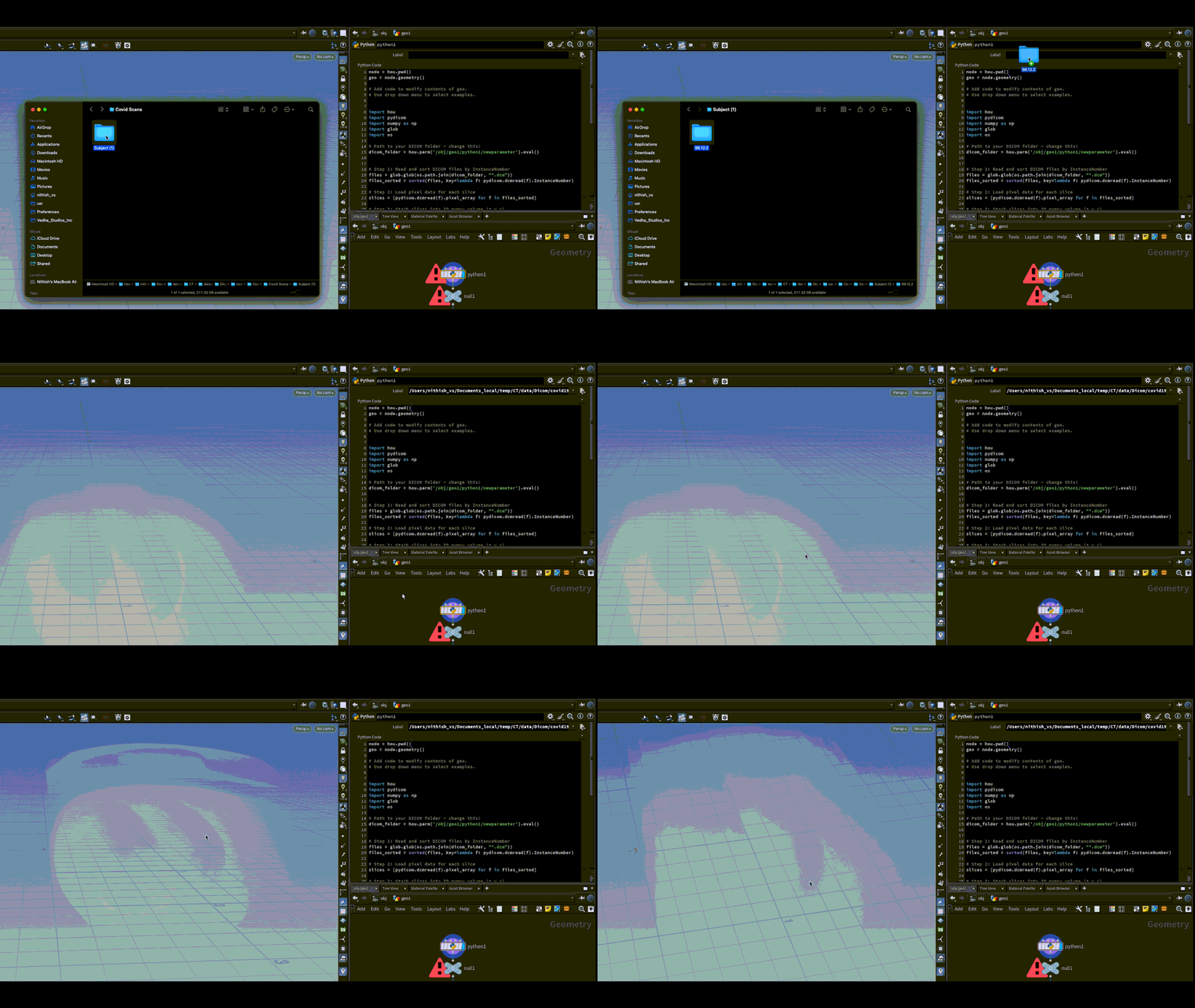
This project leverages Houdini’s native VDB tools for converting DICOM voxel data into interactive 3D volumes. While other libraries like pyopenvdb can perform similar conversions, Houdini provides a reliable cross-platform workflow with procedural control, built-in shading, and rendering capabilities.
Iso-surface extraction enables visualization of different anatomical layers, from clothing to skeletal structures, without manual segmentation.
These images are extracted from a DICOM CT scan of a patient. Using the Houdini Digital Asset, the tool automatically generates 3D iso-surfaces, allowing you to explore anatomical layers interactively. Each image below represents a different iso-surface threshold, showing the progression from external clothing to skin, organs, and skeletal structures.
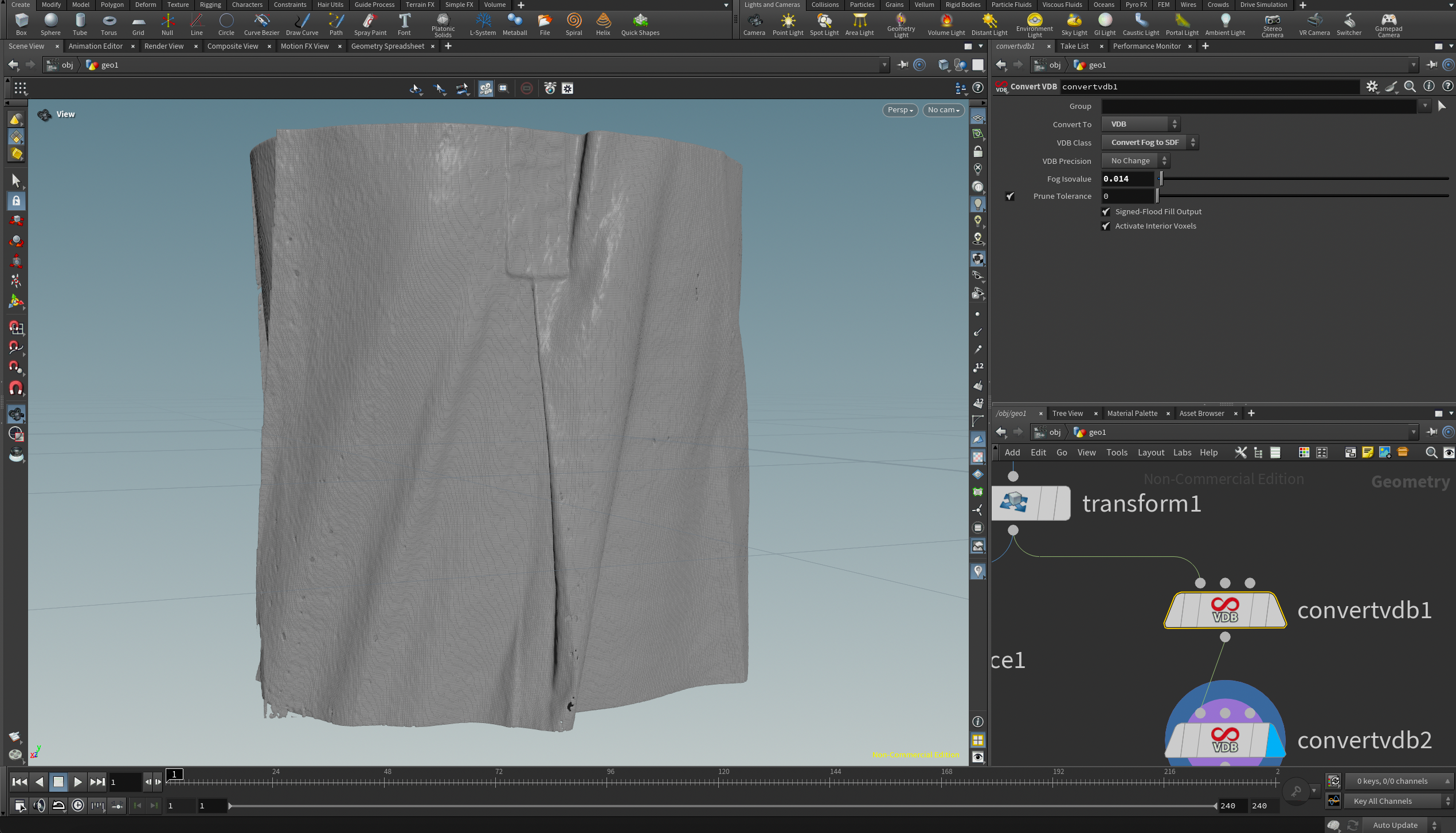
Iso – Clothes
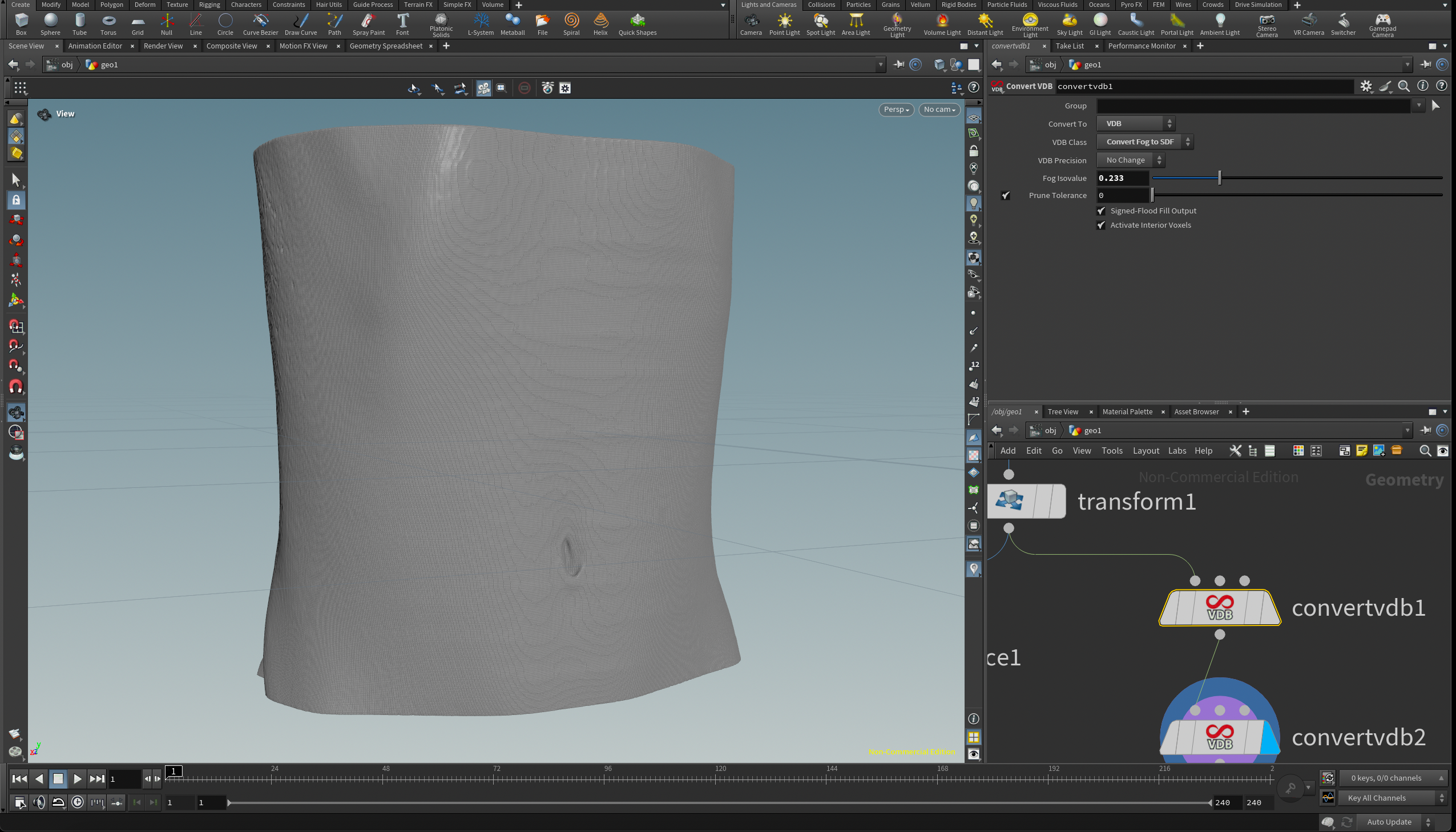
Iso – Skin

Iso – Organs
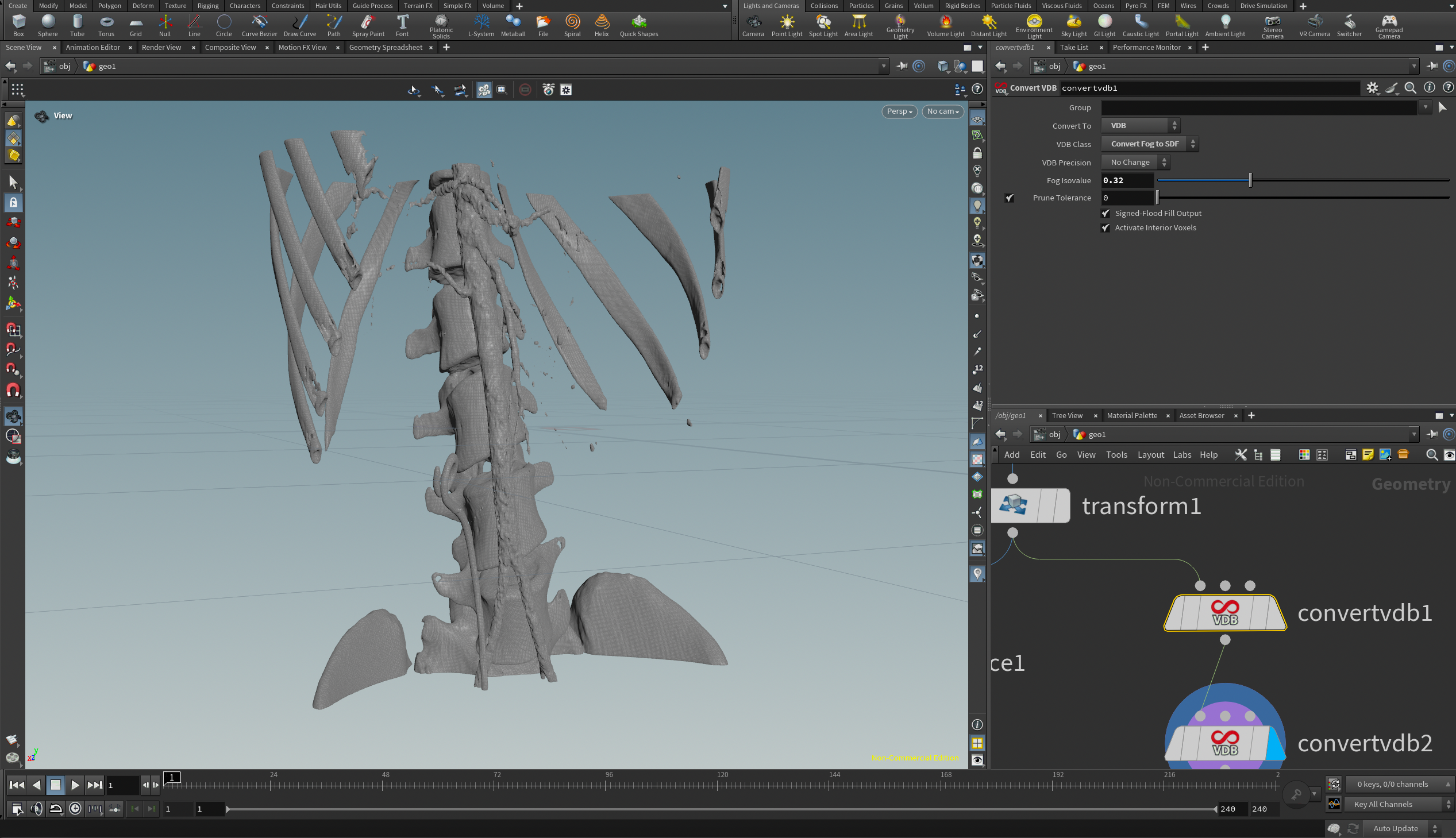
Iso – Skeleton


Vedha Studios R&D welcomes collaboration from researchers, developers, and enthusiasts interested in advancing medical visualization, procedural workflows, and volumetric analysis. If you are passionate about combining medical imaging with 3D procedural graphics, there are several ways to get involved:
To get involved, please reach out via email at research@vedhastudios.ca or visit our Research Portal for more details.